A WhatsApp agent that qualifies overnight — and pings Slack when a human should take it.
24/7 Claude replies on WhatsApp Business. Twelve-message memory per phone number. Text-only filter. The lead never sees the [HANDOFF] tag. The team gets name, number, last inbound, and what the agent already said.
Inbound WhatsApp does not wait for office hours
A lead who found you on Google, a site button, or an ad expects a reply now. Hours later they are in someone else’s chat. A canned “thanks, we will get back to you” is not qualification. This build answers, asks one question at a time, and escalates when pricing or buying intent shows up.
This is not the email outbound loop and not the LinkedIn publisher. It is an inbound inbox agent. Hyxil can send a number to test, or screen-share the n8n canvas — that offer is on the live write-up.
Businesses that already get WhatsApp enquiries
Home service contractors
Roofing, HVAC, plumbing — collect job and location, hand off when a quote is requested.
Clinics and practices
Services and hours from the agent. Appointment and price questions route to the front desk.
Real estate and ecommerce
Budget, area, or product questions first. Complaints and viewings escalate.
Agencies selling the same pattern
Run it as your own always-on assistant, or have Hyxil rebuild it on a client number and offer.
WhatsApp AI Agent — n8n canvas
The live 11-node run: inbound WhatsApp text, Claude reply with 12-message memory, invisible [HANDOFF], Slack when a human should take over.
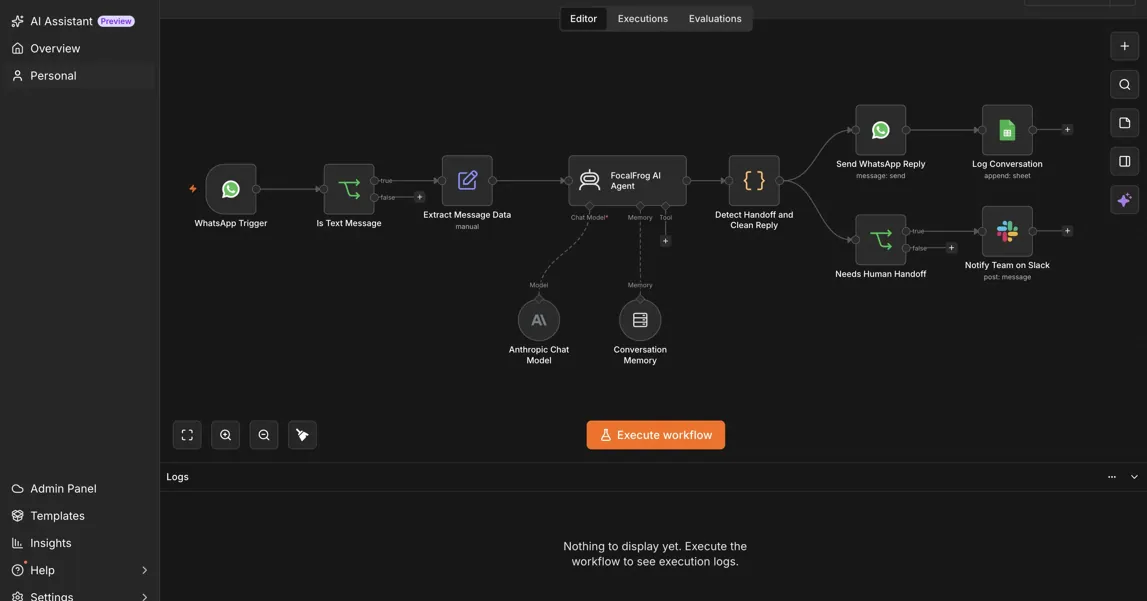
Inbound text in. Clean reply out. Slack only when needed.
WhatsApp trigger + text-only filter
Incoming messages only — outbound business sends do not loop. Voice notes, images, PDFs, and stickers are dropped so the agent never pretends it read a file it cannot see.
Extract the payload
Phone, WhatsApp profile name (or “Unknown”), message body, message ID, timestamp. The published build stamps received-at in Pakistan Standard Time.
Claude Sonnet via Langchain agent
Model claude-sonnet-4-5, temperature 0.5, max tokens 1024. Prompt rules from the live page: under 90 words, at most one question, never invent stats or client counts, do not quote exact prices, reply in the lead’s language, append [HANDOFF] when a human is required.
Window memory — 12 messages per phone
sessionKey whatsapp-{{ phone_number }}. A 3pm follow-up still knows the 9am SEO question. It does not restart the script.
Detect [HANDOFF], strip it, send, log
Code sets needsHandoff if the raw reply contains the tag, then strips every [HANDOFF] before WhatsApp send. Every exchange is appended to Sheets: timestamp, phone, inbound, AI reply, handoff flag — whether Slack fired or not.
Slack only on handoff
Name, phone, last inbound, and what the agent just sent. The human does not ask the lead to repeat themselves.
The lead never sees the switch
No handoff
Services, locations, discovery. Agent keeps qualifying. Slack stays quiet.
Handoff
Pricing, “can I talk to someone,” a call request, or anything outside scope. Tag appended internally, stripped, Slack DM fires.
Multilingual
Arabic, Spanish, Urdu, or anything else — reply in that language. No extra node per locale.
Not a decision tree
Claude follows the conversation. Qualification goals (business name, site, industry, main goal) are in the prompt, not a rigid form.
The other seven in this portfolio
WhatsApp AI Agent — short answers
Will the lead see that it is an AI?
What messages does it ignore?
Does it quote prices?
How is this different from the LinkedIn engine?
Can we try it before a build?
Want this agent on your WhatsApp number?
We will walk the 11-node canvas — text filter, memory, invisible handoff, Slack context — and map the prompt to your offer.