From a Maps search to a personalised cold email — one form, no hand work.
An n8n pipeline that scrapes Google Maps for local businesses, finds and verifies emails, researches each site with Claude, and writes a cold email for every prospect. Product, location, up to three keywords in. A Google Sheet out.
Lists of names are not a pipeline
Most cold-email tools hand you a CSV and a template. Someone still has to hunt emails, verify them, open each website, and write a first line that is not “I came across your business.” That is hours per city. This build removes those steps.
This is version 1 of the Maps pipeline — Google Places API, up to 20 results per keyword, basic listing fields. Need 40 per keyword and closed places skipped? That is Maps Scraper v2.
Agencies and B2B teams that sell to local businesses
The form takes a location and keywords. Change those two fields and the same workflow targets a different niche. Published use cases on the live write-up:
SEO and digital agencies
Roofers, HVAC, dentists — any local category in any US city. Strong Google rating plus a weak site is a usable pitch angle.
Web and video studios
Find businesses whose sites look dated. The research step gives you something specific to mention besides the company name.
B2B sales teams
Bookkeeping, staffing, cleaning, logistics — one keyword change, same verify-and-write path into the sheet.
Automation shops
Run it for your own prospecting, or have Hyxil rebuild the same class of workflow on your n8n instance and APIs.
Maps Lead Scraper — n8n canvas
The live 29-node run: one form in, Google Places scrape, email verify, Claude write, Google Sheet out.
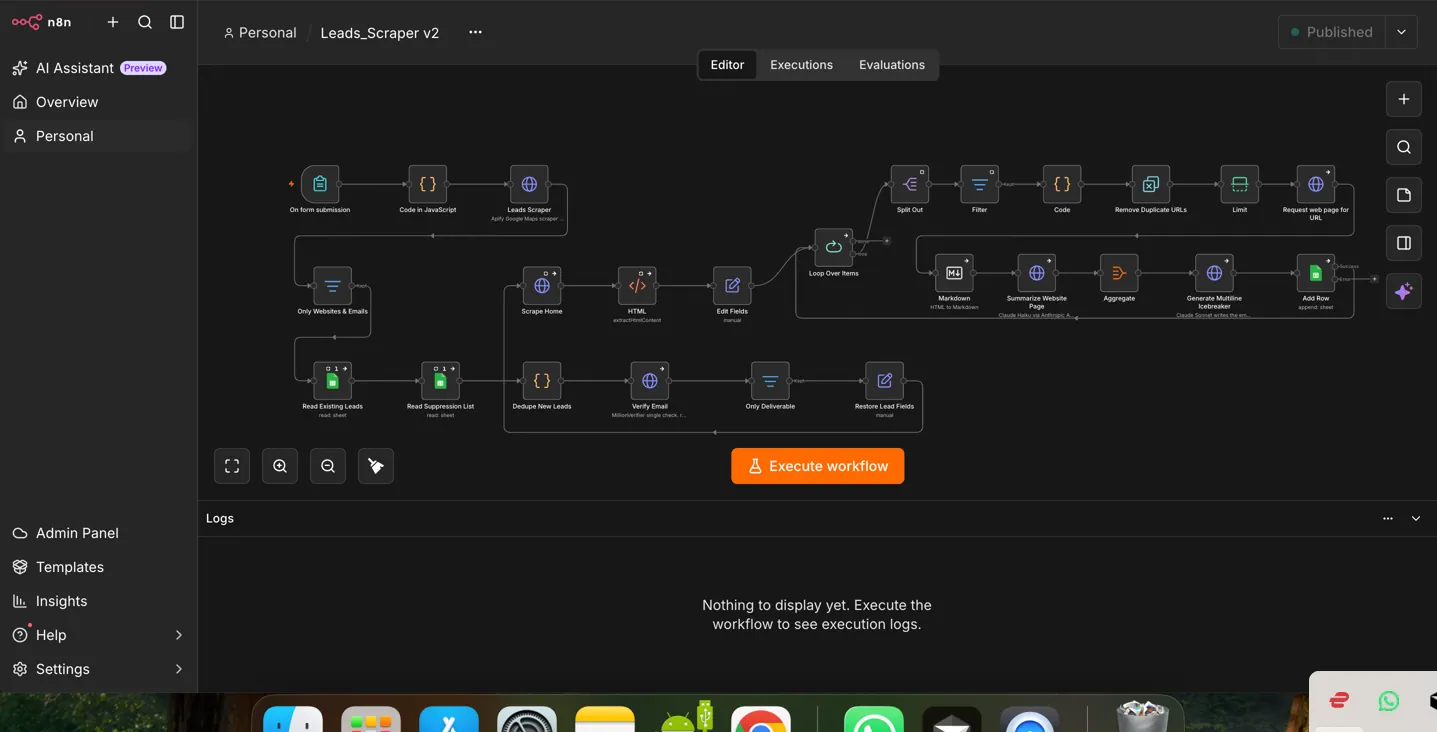
Seven stages. Zero manual steps after the form.
The operator fills product description, target location, up to three keywords, and a sender name. The rest is nodes.
Form trigger
n8n form: what you sell, where to search, which business types (max 3), and the name that signs the emails. That is the only human input for a run.
Google Places scrape
One text query per keyword — e.g. “roofing contractor in El Paso, Texas” — to Places API v1. Up to 20 results per query: name, website, phone, rating, review count, address. Three keywords → up to 60 raw listings. Duplicate URLs are dropped.
Email discovery
Each homepage is fetched. Regex pulls addresses and strips image paths, Sentry, placeholders, and Wixpress junk. Only human-looking emails continue.
MillionVerifier + dedupe
Only “deliverable” addresses stay. The batch is checked against the existing leads sheet and a suppression list so opted-out or already-contacted rows never get a new email written.
Claude Haiku research
Homepage → Markdown → up to 8,000 characters to Claude Haiku 4.5. It summarises what they do, who they serve, and one detail worth referencing (service area, guarantee, years in business). Empty pages return NO_CONTENT.
Claude Sonnet writes the email
Company, city, rating, reviews, and the Haiku summary go to Claude Sonnet 4.6. Rules from the live build: 50–90 words, exactly one research detail, reply-only CTA, no links, no em dashes, no exclamation marks. Output is JSON: subject, body, PS.
Google Sheet — ready to send
Name, email, website, subject, body, PS, verification, timestamp. Status starts pending. The same sheet later tracks sent, replied, bounced, and follow-ups when the outbound workflows are attached.
Subject: Quick question about your roofing website, Team
Hi Team, I came across Southwest Roofing and noticed you cover both residential and commercial roofing across the El Paso metro. I work with contractors like yours on SEO — getting your website to show up when homeowners search for roofers nearby. Your 4.8 rating on Google is strong. The website just needs to be as visible as your reputation. Worth a quick chat?
The same research, without the tab-hopping
Without this workflow
- Search Maps per keyword and city by hand
- Copy names and sites into a sheet
- Hunt emails on each homepage
- Paste addresses into a verifier
- Write a different opener for every row
- Check duplicates against last month’s list
With Maps Lead Scraper
- One form: product, location, keywords, name
- Places API pulls up to 20 listings per keyword
- Site scrape + MillionVerifier in the same run
- Haiku research + Sonnet email per lead
- Dedupe against sheet and suppression list
- Verified, written rows sitting in Google Sheets
The workflow on your accounts — not a trial login
Hyxil is n8n certified. You own the instance, the sheet, and the API keys. This page is a shipped write-up, not a SaaS storefront.
The other seven in this portfolio
Maps Lead Scraper — short answers
Is this the same as Maps Scraper v2?
Does it send the emails?
What does a run actually need from a human?
Can I buy this as software?
How do I see it run?
Want a Maps-to-sheet pipeline on your accounts?
We will open the 29-node canvas — form, Places, verify, Haiku, Sonnet, Sheet — and tell you what it takes to run the same class of system on your stack.