Daily 5pm send that stays inbox-safe — cap, delays, and a six-gate filter.
A 9-node n8n workflow. It reads the sheet, keeps only unsent verified rows, fires from the correct Gmail account, waits 3–8 minutes between messages, and writes Sent or Failed on every row. Nothing silent.
A blast is not a sending system
Cold email dies when volume spikes, when delays are identical, or when a bad address goes out because nobody re-checked the sheet. This workflow is the machine that actually presses send — not the scraper, not the follow-up, not the bounce classifier.
The live site currently repeats a lot of system-wide copy on this URL. This page is the sender slice only. For scrape + send + follow-up + track + suppress together, open the Cold Email System.
Teams that already have written, verified rows
The sender assumes a Google Sheet with subject, body, verification status, and a blank sent_at. In the published stack those rows come from a Maps scraper. The same 9 nodes can drain any sheet that meets the six-condition filter.
Agencies warming a domain
Hard 20/day cap. The workflow notes week 1 = 10/day max on a new domain. The cap is one node — raise it as reputation holds.
Two-sender desks
The published build sends from two Gmail accounts (Nick and David). Follow-ups later match the same sent_from value so the thread stays with one person.
Operators who need a paper trail
Success writes Status, timestamp, and Gmail message ID. Failure writes Status = Failed plus the error. You can see what did not go out.
Anyone attaching bounce tracking
The stored message ID is what the hourly tracker uses to match replies and bounces back to the row.
Cold Email Sender — n8n canvas
The live 9-node run: 5pm daily, six-gate filter, 20-cap, 3–8 minute delays, dual Gmail, Sent or Failed on every row.
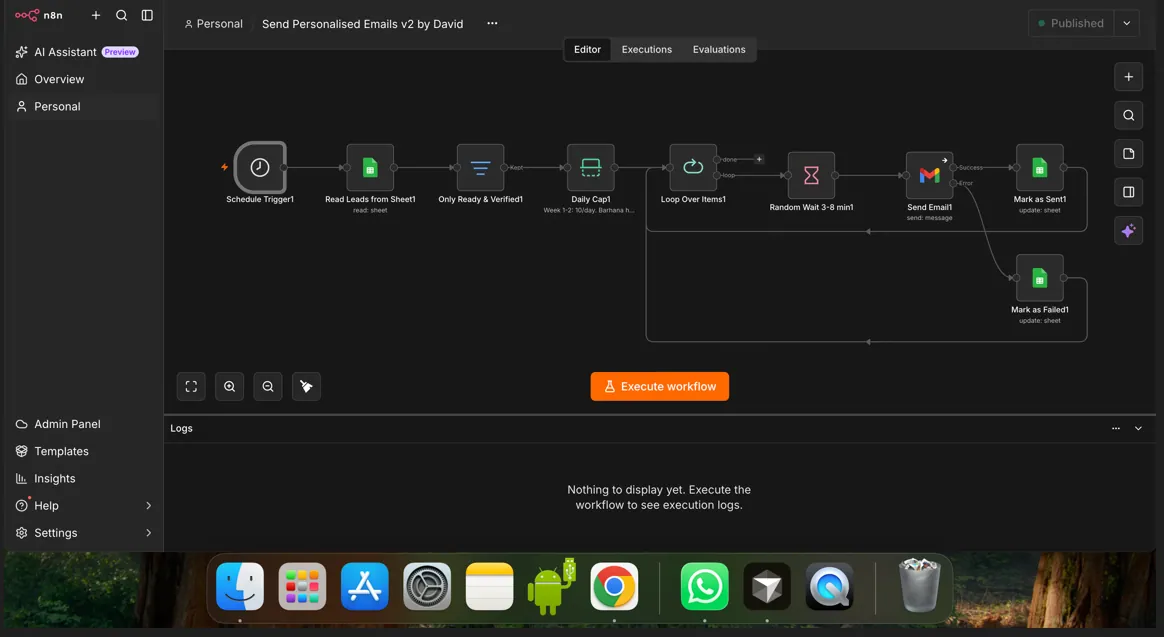
Four moves, every day at 5pm
Schedule + full sheet read
Cron at 5pm. Every row is read, then passed through the filter. The workflow does not “remember” yesterday — the sheet is the state.
Six conditions, all must pass
Email body present. Subject present. sent_at empty. Email looks valid. Verification is safe, ok, or role_account. Status is not do_not_send. Fail any one and the row stays in the sheet, unsent.
Cap 20 + random 3–8 minute wait
A hard daily cap stops volume spikes. Between sends the wait is Math.floor(Math.random() * 301) + 180 — 180 to 480 seconds, recalculated each time so the pattern is not mechanical.
Gmail send — row updated either way
On success: Status = Sent, timestamp, Gmail message ID. On failure: Status = Failed and the error text. The next day’s 5pm run will not re-pick a row that already has sent_at.
Pacing rules, not a hope-and-blast node
Human-like gaps
180–480 seconds between messages, fresh each time. Built to look like someone typing and clicking send, not a firehose.
Reputation-aware cap
20/day in production. Week-1 note in the workflow: 10/day on a new domain. One node to change.
Dual Gmail
Published build uses two accounts. sent_from is written so follow-up can stay in the same thread from the same name.
No silent failures
Failed rows keep the error. You do not discover a dead send three days later when follow-up has nothing to hang on.
The other seven in this portfolio
Cold Email Sender — short answers
Is this the full cold-email system?
Why 20 a day and a random wait?
What if Gmail rejects a send?
Does it send to unverified addresses?
Can Hyxil put this on our inboxes?
Want paced sending on your Gmail accounts?
We will open the 9-node canvas — 5pm trigger, six-gate filter, 20-cap, random wait, Sent/Failed writeback — and map it to your sheet columns.